Introducing Xpert Bosi: your AI team leader on the desktop
Today we’re introducing Xpert Bosi, the desktop app for working with your AI team. Bosi brings Xpert’s digital experts, conversations, tools and application workbenches into one place, with installers for macOS, Windows and Linux.
Xpert Bosi brings AI teamwork into enterprise settings, with complex permission controls, role management, and the ability to develop and deliver custom Agentic Apps.
You set the goal. Bosi leads the team.
Download Xpert Bosi · Bosi 0.2.0 on GitHub

Xpert Bosi launch illustration.
Bringing AI teams into enterprise work
Products such as Grok Bots show what working with an AI team can look like: users delegate tasks to specialists that use tools and collaborate over time. Bosi brings that experience into enterprise work, with organization structures, specialist responsibilities, business processes and application development at the center of the product.
Grok Bot already offers enterprise access, network and audit controls, while Team Bots supports shared experts and context. Bosi focuses on the more complex organizational and business requirements enterprises need to manage: connecting tenants, organizations, workspaces, user roles and expert access, then delivering custom business applications to teams. The connected Xpert platform provides these capabilities. Grok Bot for Enterprise · Team Bots
A desktop for working with your AI team
Real work rarely ends with a single answer. Turning a customer document into a bill of materials can involve requirements, product details, material checks and cost estimates. Responding to a factory exception can require equipment, quality and production specialists to coordinate before anyone approves a recovery plan.
Bosi gives that collaboration a place on your desktop. Choose a digital expert, provide the task and its context, then follow the work in conversation and dedicated application views. The connected Xpert platform runs the Agents and workflows; Bosi brings their work into a shared interface where you can inspect results and make decisions.
Permissions and roles for enterprise collaboration
A business task can involve operational staff, application developers, managers and several digital experts. Teams need explicit rules for access to materials, changes to expert configurations, use of published applications and actions that require approval.
Bosi and the Xpert platform organize those rules at three levels:
- Organizations and resource access: manage resources within tenants, organizations and workspaces, and use user groups to define who can use a published digital expert.
- Human roles and permissions: assign permissions for member management, expert editing and knowledge-base maintenance. The people who use an expert can have different responsibilities from those who maintain its configuration.
- Agent roles and responsibilities: equip engineering, procurement, quality or production specialists with their own knowledge, models and tools. Coordinate their work through workflows, with human review steps where needed.
For a BOM process, a company can configure roles, resource access and workflow steps around engineering document preparation, procurement checks and management review. Bosi provides the shared interface; the Xpert platform and business application enforce the configured permissions and approval steps.
Find and organize your digital experts
Sign in with your Xpert account and choose an organization. Discover & add brings together accessible digital experts, applications and Assistant templates. Use an available expert, request access where needed, or initialize an application or template in a workspace you can manage.
Pin frequently used Assistants and organize your sidebar around the way you work. Moving between specialists keeps their conversations and application context within reach. Available resources follow the permissions of your connected Xpert service.
Conversation and workbench, side by side
The conversation explains what is happening. The workbench gives you a place to inspect and work with the result. An Agentic App can provide documents, diagrams, process views or business interfaces alongside the conversation, so you can review details without reconstructing them from messages.
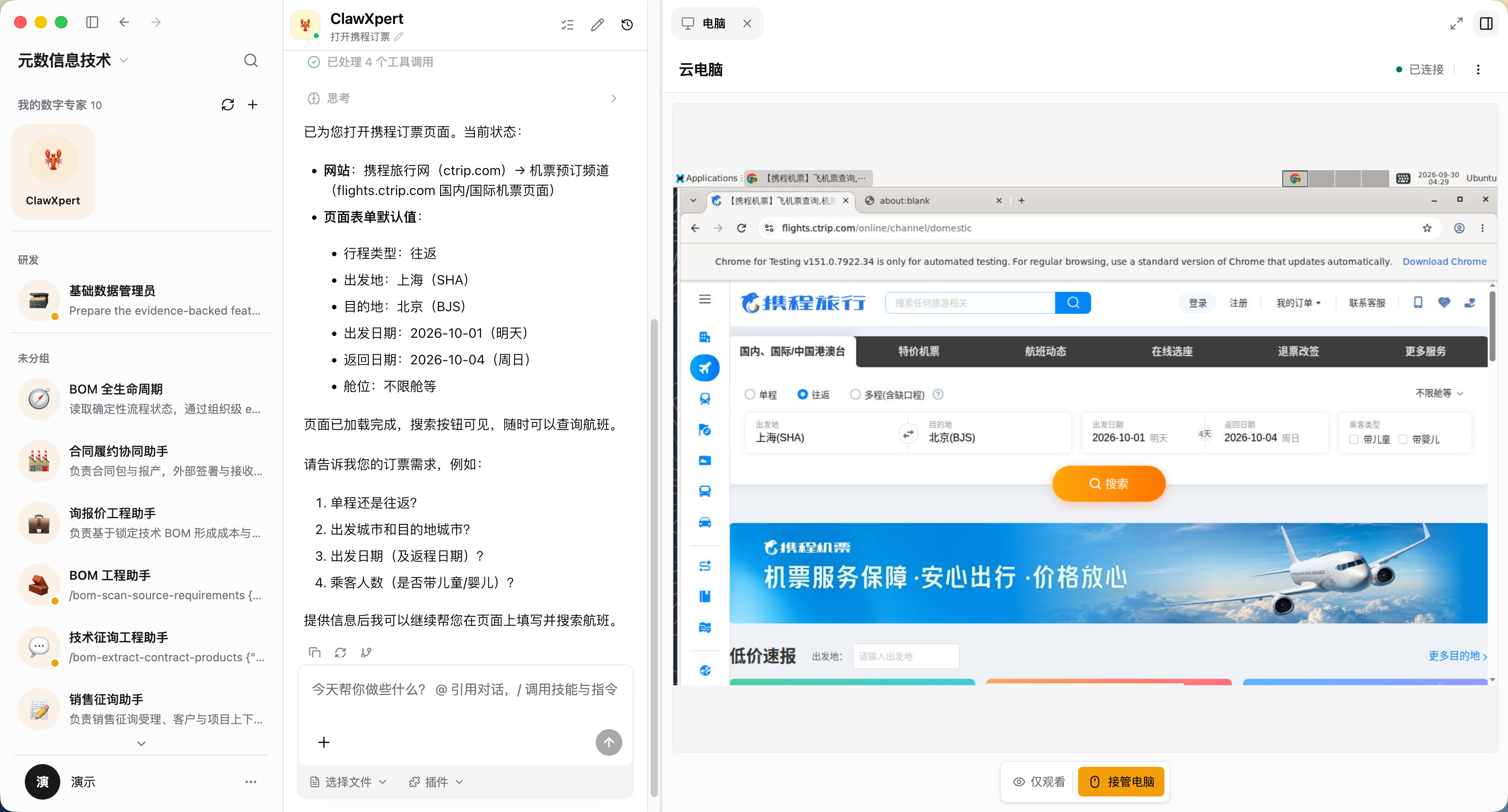
A cloud-computer demonstration in Bosi: follow the Agent’s conversation alongside the remote browser, with a control to take over the computer.
For example, a configured BOM application can bring source documents, product details and material checks into a process view. Teams can see completed steps, missing information and blocked work. A factory recovery application can present specialist assessments and proposed actions for human review. These illustrate what teams can build with Agentic Apps and use through Bosi.
Give Agents tools to act
Bosi connects the desktop experience to the capabilities configured in Xpert. Plugins and tools can bring enterprise data, external services and execution environments into a task.
With a configured cloud-computer capability, an Agent can work through a remote desktop while you inspect its actions and take over when needed. The Desktop Shell preview on macOS also lets an authorized Assistant request local commands. By default, each command asks for approval in the conversation before execution.
These capabilities require the corresponding server configuration and permissions. Installing Bosi gives you the desktop client; your Xpert service supplies the models, Agents, tools and Apps available to your team.
Custom Agentic Apps: deliver your way of working as an application
An Agentic App combines specialist roles, tools, workflows and interactive views into an application that a team can reuse. Bosi is the desktop entry point for that application; Xpert is the platform for building, publishing and governing it.
Custom Agentic App development is a key differentiator for Bosi and the Xpert platform. Enterprise developers can define specialist Assistants, connect business tools and data, orchestrate processing and approvals, and develop dedicated workbenches embedded in Bosi. Applications and templates can be packaged as installable plugins for teams to use repeatedly.
Grok Bot’s published template mechanism reuses skills, memories and plugins; its documentation says custom code, scripts and non-standard MCP servers are not bundled with a template. As of September 30, 2026, the public materials we reviewed do not describe a corresponding native Agentic App development and delivery system combining specialist Assistants, tools and workflows, and embedded business workbenches. This comparison concerns the application extension model; it does not imply that Grok Bot cannot write software or connect custom tools. Grok Bot template guide
Start with the task your team actually needs to complete: preparing a presentation, editing a document, building a site, or coordinating a business process. Explore the App catalog for existing applications, or use the Xpert platform to develop a workflow and workbench around your own requirements.
Download Bosi and start your first task
Bosi 0.2.0 is available from GitHub Releases. The download page links to an installer for each supported system and processor:
| System | Processor | Installer |
|---|---|---|
| macOS | Apple Silicon / ARM64, Intel / x64 | DMG |
| Windows | x64, ARM64 | EXE |
| Linux | x64, ARM64 | AppImage |
The release also includes ZIP or tar.gz archives and SHA-256 checksums. The macOS packages are signed and notarized; this release’s Windows packages are unsigned and may trigger an operating-system security prompt.
- Download and install the package matching your computer.
- Connect and sign in. Official builds connect to the hosted Xpert service by default. For self-hosted Xpert, configure your service addresses in Connection & appearance before signing in.
- Choose your team. Select your organization, open Discover & add, and choose an available Assistant.
- Bring a real task. Provide the goal and relevant materials, then follow progress and review the result in the workbench.
Bosi needs a network connection to an Xpert service. For connection settings and source builds, see the Desktop guide.
Your next goal is a good place to start. Download Bosi and bring your AI team to the desktop.