Xpert Launches MCP Apps for Interactive Agent Results
Xpert + ChatKit now supports MCP Apps. Plugins can provide standard MCP tools and turn tool-call results into real interactive applications inside the conversation.
Users can ask a business question in ChatKit and then work directly with a chart, map, form, media browser, or analysis panel in the answer. The model understands the intent and starts the tool call; the MCP App carries the interaction, state, and follow-up actions.
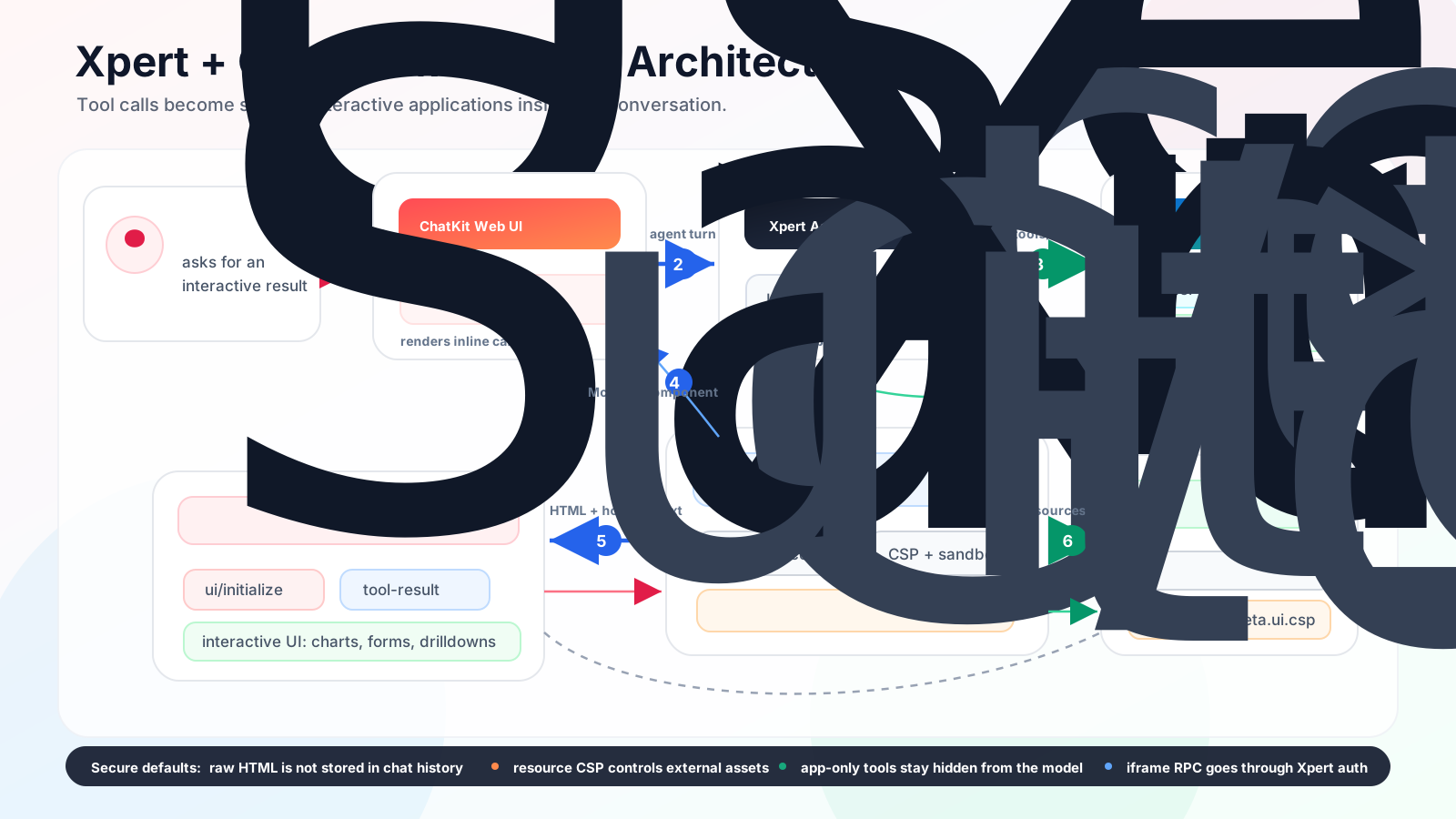
Xpert + ChatKit MCP Apps architecture: tool calls, MCP Apps Host, sandboxed iframe, and plugin MCP server working together.
Why MCP Apps Matter
Traditional tool calls are good at returning text and structured data, but many real workflows do not end with a single answer. Users often need to:
- click a chart to inspect the next level of data
- change a metric, date range, or filter
- adjust parameters in a form and recalculate
- inspect a map, file, media item, or diagnostic panel
- continue the conversation using the current interactive state
Previously, these workflows usually required a custom frontend page, a platform extension view, or a dedicated widget. MCP Apps provide a new route: an MCP server returns an HTML App through a standard resource, and ChatKit hosts it safely while proxying communication through the MCP Apps bridge.
What Xpert Supports
This release follows the standard MCP Apps protocol and includes:
- discovery of MCP tool
_meta.ui.resourceUri - inline ChatKit iframe rendering for
ui://resources - validation of
text/html;profile=mcp-appMCP App resources - standard JSON-RPC bridge support, including
ui/initialize,ui/notifications/tool-input,ui/notifications/tool-result,tools/call,resources/read, and iframe resize - app-only tools through
_meta.ui.visibility = ['app'], callable by the iframe but hidden from the model - CSP, browser permissions, and rendering preferences from resource metadata
- short-lived app instances that avoid storing raw HTML in conversation history
- plugin-managed MCP servers installed through Xpert plugins
ChatKit implements the standard MCP Apps bridge. It does not depend on the ChatGPT-specific window.openai API. Plugins may keep _meta["openai/outputTemplate"] as a compatibility alias, but Xpert's runtime path is standard MCP Apps first.
Plugins Become the Delivery Vehicle
For developers, the most natural delivery model is an Xpert plugin:
plugin
└── plugin-managed MCP server
    ├── model-visible tool
    ├── app-only tools
    └── ui:// MCP App resource
The plugin declares the MCP server, tool policy, permissions, and build artifacts. Xpert installs the plugin, creates the MCP Toolset, executes Agent tool calls, and renders the MCP App in ChatKit.
This keeps the tool capability and interactive result in one versioned, installable, and rollback-friendly package. Enterprise teams can deliver internal systems, analysis logic, and visual workflows to Agents without modifying Xpert core code.
Example: Sales Performance Drilldown App
To validate the full path, we provide the @xpert-ai/plugin-echarts-mcp-app sample plugin. It implements a sales performance analysis App:
echarts_sales_overview: a model-visible tool that returns sales summary, structured chart data, andui://echarts-sales-dashboardecharts_sales_drilldown: an app-only tool called by the iframe when the user clicks the chartui://echarts-sales-dashboard: an MCP App resource that returns an ECharts-powered inline analysis interfacesrc/app: Vanilla TypeScript frontend source built with esbuild intodist/app/index.html
In ChatKit, a user can ask: "Show 2026 revenue by region and support drilldown analysis." The model calls the overview tool, and the answer contains an interactive chart. When the user clicks a region, the App calls the app-only drilldown tool and moves into product or month analysis.
This is only the starting point. Real business Apps can connect CRM, ERP, metric platforms, semantic models, or warehouses, and then add anomaly explanation, YoY/MoM analysis, recommended actions, and approval-gated tools.
How It Fits With Existing Xpert UI Surfaces
MCP Apps do not replace ChatKit Widgets, Extension Views, or Agent Middleware. They fill a different space:
| Capability | Best fit |
|---|---|
| ChatKit Widgets | Controlled, declarative, structured UI snippets |
| Extension View | Persistent workbench pages, configuration screens, and integration detail pages |
| Agent Middleware | Tool registration, call interception, and Agent workflow enhancement |
| MCP Apps | Inline interactive applications produced by tool calls |
In short: if the UI is the result of a tool call and needs rich interaction, use MCP Apps. If the UI is part of the platform surface, keep using Extension Views.
Secure Defaults
MCP Apps run in sandboxed iframes. The Xpert Host validates resource MIME type, CSP, tool visibility, and Toolset policy. Conversation history stores only safe metadata, not raw HTML.
Recommended practices:
- keep only
resourceUriandvisibilityon tool_meta.ui - put CSP, browser permissions, and
prefersBorderon resource metadata - mark app-only tools with
_meta.ui.visibility = ['app'] - route every iframe tool call through Xpert backend authorization and audit
- keep external script domains, connection domains, and iframe permissions minimal
Next Step
Start with these docs:
- ChatKit MCP Apps: host runtime, bridge behavior, and security model for Xpert + ChatKit
- Build a Sales Performance MCP App Plugin: build an interactive business analysis App from the plugin side
For protocol details, continue with the MCP Apps API, Build an MCP App, and ChatGPT MCP Apps compatibility.
MCP Apps move Agent answers beyond text and cards. They bring interactive business workspaces into the conversation, so users can ask, inspect, and act in one place, while plugin developers get a much richer application surface.